


Why Your Security Plugin Can’t Protect You From Helpful Clients (And What Can)
If you’ve been managing WordPress sites for clients for any length of time, you’ve probably experienced that sinking feeling. You know the one, when you get an email that starts with “I clicked update and now my site is broken…”
Maybe it was a client who updated a critical plugin without testing it first. Or perhaps they created an admin account for their marketing agency, who later on deleted your access and migrated the site elsewhere. Or maybe they just kept sending support tickets every time a plugin update notification appeared, “just in case you hadn’t seen it.”
These scenarios happen more often than most of us would like to admit. And here’s the thing, your security plugin, no matter how robust, can’t prevent them.
The Gap Between External Security and Internal Risk Management
When we think about WordPress security, we typically focus on external threats. Malware, brute force attacks, vulnerability scans, suspicious login attempts from unknown locations. Tools like Wordfence, All In One Security, and Solid Security do an excellent job protecting against these threats.
But there’s another category of risk that these plugins aren’t designed to handle: the well-intentioned client who has legitimate admin access but doesn’t understand the consequences of their actions.
This isn’t about malicious intent. These are authorized users doing things they genuinely believe are helpful. And because they have legitimate access, your security plugin sees nothing wrong with their activities.
Real Problems That Security Plugins Don’t Address
Let me share some specific scenarios that illustrate this gap:
The Helpful Plugin Update Your client sees a notification that a plugin needs updating. They think they’re being proactive by clicking “update now” without realizing it’s a major version change that could break their custom theme integration. Your security plugin sees an authorized admin performing a routine update—nothing suspicious there.
The Marketing Agency Handover Your client gives admin access to a new marketing agency. The agency, wanting to “take full control,” deletes your admin account and changes hosting providers. By the time you realize what’s happened, you’ve lost access to months of development work. Again, your security plugin sees legitimate admin users performing normal admin functions.
The Overwhelmed Client Every plugin update & “rate this plugin” notification becomes a support ticket. Your client doesn’t know which updates are safe to install and which ones need testing. They’re paying you to manage their site but feel responsible for monitoring these notifications. Your security plugin dutifully protects against external threats while your inbox fills with unnecessary support requests.
Introducing Administrator Toolkit: Internal Risk Management
This is where Administrator Toolkit fits into your security ecosystem. While your security plugin handles external threats, Administrator Toolkit manages internal risks by controlling what authorized users can see and do within the WordPress admin area.

Think of it as adding a “client safety layer” to your existing security foundation. Here’s how it works:
Plugin Protection and Workflow Management
Administrator Toolkit lets you control which plugins clients can see in their admin dashboard. You can hide critical plugins entirely, preventing accidental deactivation or deletion. For plugins that clients need to see, you can add notes explaining whether they should avoid updating it or when a license is due to expire.
The plugin also includes a “protected mode” feature that prevents other administrators from deactivating or deleting essential plugins, even if they can see them.
Admin Dashboard Cleanup
One of the biggest sources of client confusion comes from the cluttered WordPress admin dashboard. Between promotional messages, update notifications, and various admin notices, clients often feel overwhelmed or click on things they shouldn’t.
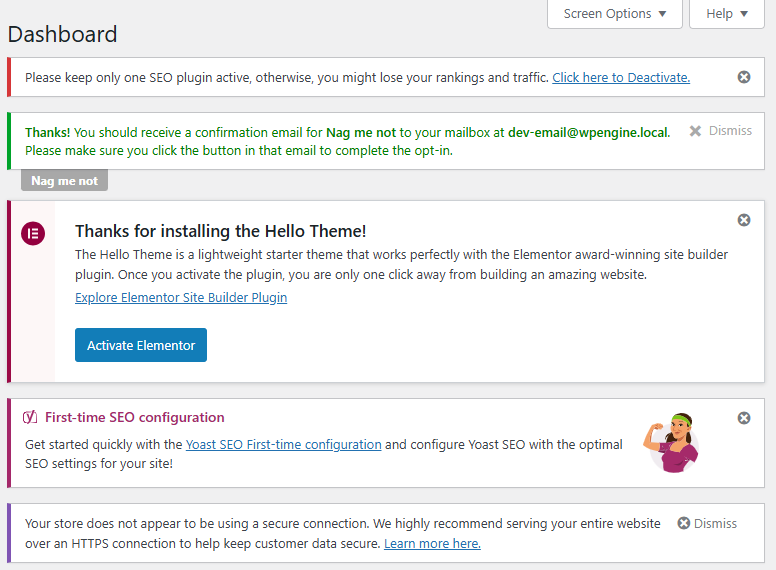
Administrator Toolkit annual plans include a license for “Nag Me Not”, which hides theme and plugin update / “rate this” notifications from client administrators. You can strike a balance between keeping clients informed and preventing them from taking actions that might break their site.
Enhanced Session and Access Controls
While security plugins focus on preventing unauthorized access, Administrator Toolkit adds controls for authorized users. It enforces email-only logins for administrators (preventing username-based social engineering), restricts admin sessions to one hour instead of WordPress’s default 14 days, and can limit admin access based on geographic location.
The plugin also maintains an “allowed administrator email domains” list, preventing clients from creating admin accounts for email addresses outside of approved domains. This addresses the scenario where clients give access to agencies or contractors without your knowledge.

Monitoring and Alerting for Internal Activities
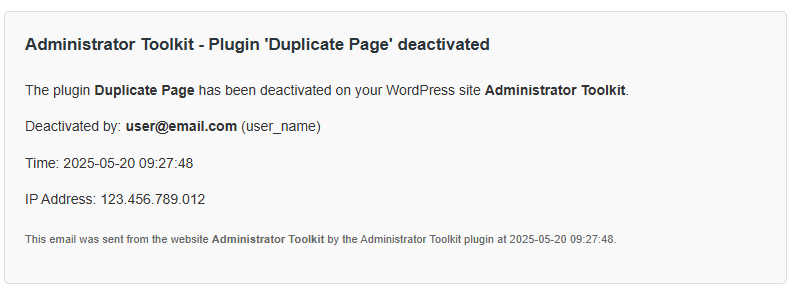
Administrator Toolkit tracks and logs all administrator login activity, including location, IP address, and device information. It sends automated notifications for suspicious login attempts or logins from new locations—but focuses specifically on administrator-level access rather than general user activity.
You can also set up “emergency-use only” admin accounts with special monitoring, ensuring you’re notified if backup access credentials are ever used.

How This Complements Your Existing Security Setup
The key thing to understand is that Administrator Toolkit doesn’t replace your security plugin, it works alongside it to address a completely different category of risks.
Your security plugin handles:
- Malware scanning and removal
- Firewall protection against external attacks
- Brute force attack prevention
- Vulnerability detection and alerts
- Bot protection and traffic filtering
Administrator Toolkit handles:
- Client-caused site breakage prevention
- Internal access governance
- Admin workflow management
- Client dashboard simplification
- Agency relationship protection
There’s minimal overlap between these functions. Both are necessary for a complete WordPress management strategy, especially if you’re managing sites for clients who have admin access.
Installation and Compatibility
Administrator Toolkit is designed to work alongside existing security plugins without conflicts. Whether you’re using Wordfence, All In One Security, Solid Security, or another security solution, you can install Administrator Toolkit as an additional layer of protection.
The plugin focuses on admin user interface modifications and access controls, while security plugins focus on threat detection and prevention. They operate in different areas of WordPress functionality.
Real-World Impact
The value of Administrator Toolkit becomes clear when you consider the time and money involved in fixing client-caused issues. A single accidentally broken site can result in hours of debugging, testing, and repair work. Multiple this by several clients and multiple incidents, and the cost adds up quickly.
More importantly, preventing these issues preserves your client relationships. Instead of having uncomfortable conversations about charges for fixing problems they created, you can focus on proactive improvements and new features.
Making the Investment Decision
If you’re managing WordPress sites for clients who have admin access, Administrator Toolkit addresses risks that your security plugin simply can’t handle. The question isn’t whether these client-caused issues will happen—it’s when, and how much they’ll cost you in time and client relations when they do.
The plugin includes a 14-day satisfaction guarantee, so you can test it in your environment and see how it integrates with your existing workflow and security setup.
Complete Your Security Stack
A comprehensive WordPress security strategy requires protection against both external threats and internal risks. Your security plugin handles the first category excellently. Administrator Toolkit handles the second.
Together, they provide coverage for the full spectrum of risks that WordPress professionals face when managing client sites. Because sometimes the biggest threat to a WordPress site isn’t a hacker—it’s a helpful client who just wants to keep their website up to date.
Continue reading:
